How to attended transfer the call?
Attended transfer allows you to redirect an ongoing call to another destination while first consulting with the target party, so you can announce the call and decide whether to complete the transfer or not.
Another very useful function is attended transfer, which you can use when you want to pass an active call to another client while staying in full control of the process. Instead of immediately redirecting the caller, you first establish a short consultation call with the third party, inform them about the incoming call, and only then complete the transfer using the AttendedTransfer() method. This approach offers a smoother caller experience and lets your softphone or PBX perform call redirection in a controlled, SIP-compliant way during live conversations.
Using AttendedTransfer during a call, we can notify the third party about the incoming call by calling it, and then redirect the call.
if (call != null && !string.IsNullOrEmpty(destination))
{
	call.AttendedTransfer(destination);
}
Call flow diagram
The diagram below illustrates a full SIP Attended transfer call flow.
Capture SIP Attended Transfer traffic with Wireshark
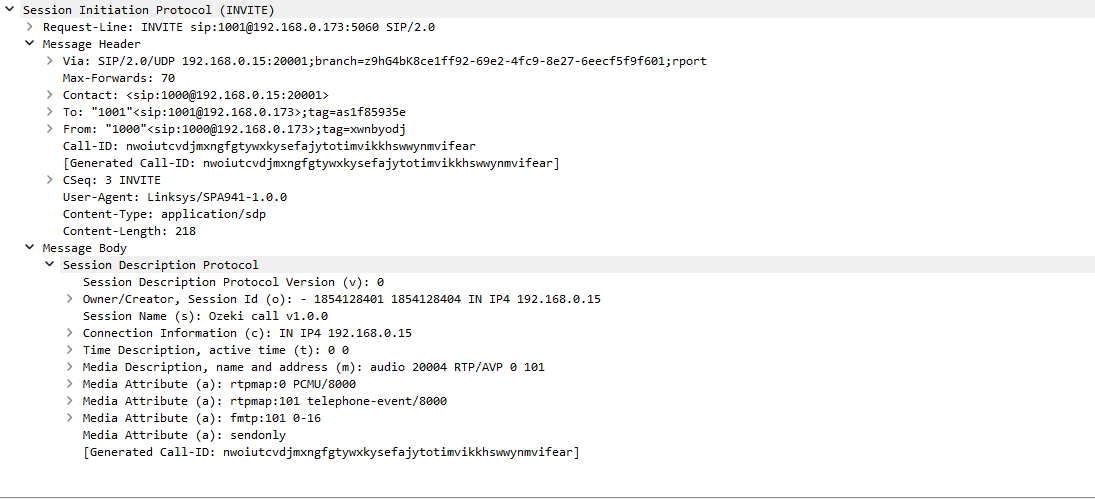
SIP Attended transfer Invite PDU
A SIP Attended Transfer Invite PDU is the INVITE message the transferring endpoint sends to establish a consultation call with the third party before completing the transfer. It carries standard headers such as From, To, Call-ID and CSeq, and an SDP body describing the media parameters for this temporary leg. By setting up this extra dialog, the softphone can speak to the target party first, then decide whether to proceed with redirecting the original caller.
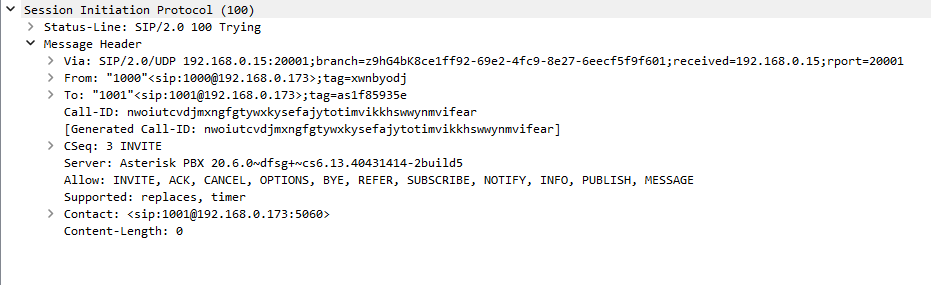
SIP Attended transfer Tyring PDU
A SIP Attended Transfer Trying PDU is the provisional 100 Trying response that confirms the consultation INVITE has been received and is being processed by the target endpoint or PBX. It keeps the same Call-ID and dialog tags to associate this status with the new attended-transfer leg. This PDU shows in Wireshark that the consultation call setup is underway even though it has not yet started ringing or been answered.
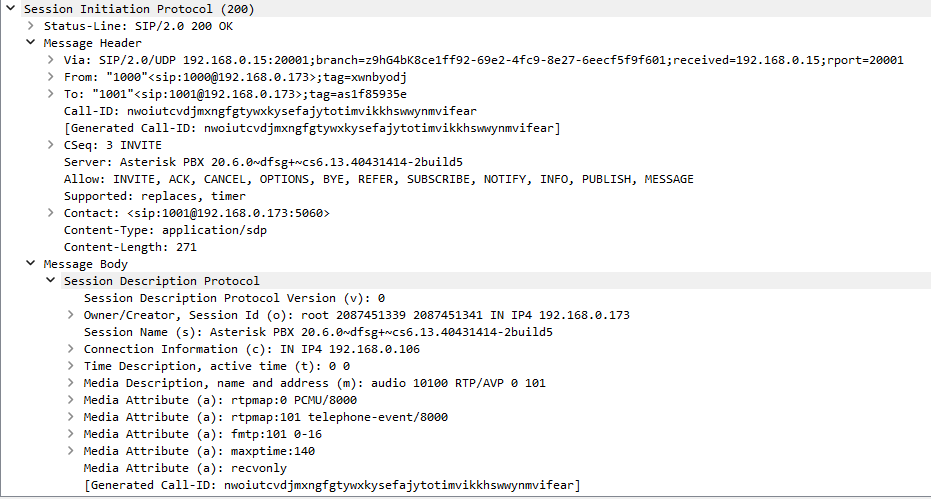
SIP Attended transfer OK(Invite) PDU
A SIP Attended Transfer OK (Invite) PDU is the 200 OK response indicating that the consultation call has been successfully established with the third party. Its SDP body advertises the agreed codecs and media directions, just like a normal answered INVITE. Once this OK is received, the transferring endpoint can talk to the target party and prepare to execute the attended transfer.
SIP Attended transfer ACK PDU
A SIP Attended Transfer ACK PDU is the acknowledgment the transferring endpoint sends after receiving the 200 OK for the consultation INVITE, completing that three‑way handshake. It confirms that both sides have agreed to the call parameters and that media can now flow on this attended-transfer leg. In the trace, this PDU marks the moment when the consultation conversation becomes fully active.
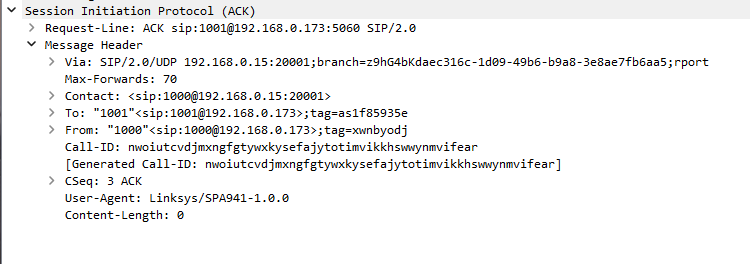
SIP Attended transfer Refer PDU
A SIP Attended Transfer Refer PDU is the SIP REFER request the transferring endpoint sends to instruct the original caller’s leg to connect to the consulted third party. It includes a Refer-To header pointing at the target URI and reuses the established dialog identifiers of the original call. This PDU is the key signal that converts the separate consultation into a full attended transfer.
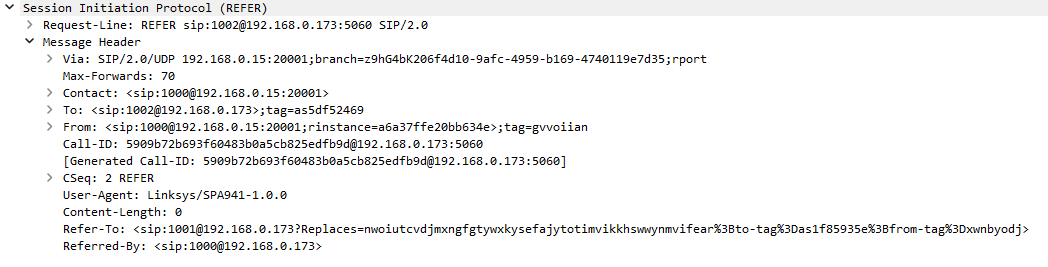
SIP Attended transfer Accepted PDU
A SIP Attended Transfer Accepted PDU is the 202 Accepted response to the REFER, indicating that the remote endpoint or PBX has accepted responsibility for carrying out the attended transfer. It echoes the Call-ID and CSeq of the REFER so the transaction can be tracked reliably. After this PDU, the transferor expects NOTIFY messages describing the progress of connecting the caller to the target party.
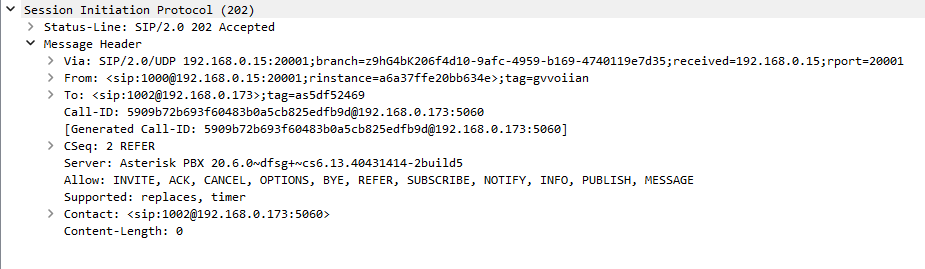
SIP Attended transfer Invite PDU
This SIP Attended Transfer Invite PDU is the INVITE issued as part of the transfer process to connect the original caller directly to the attended target after the REFER is accepted. It may be sent by the PBX or remote endpoint using the information in the Refer-To header. In the capture, it appears as a new dialog that ultimately replaces the consultation leg.
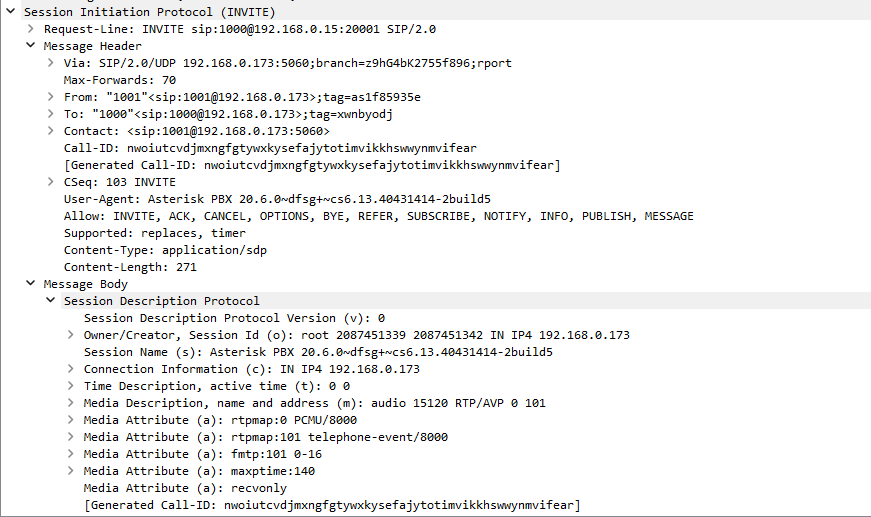
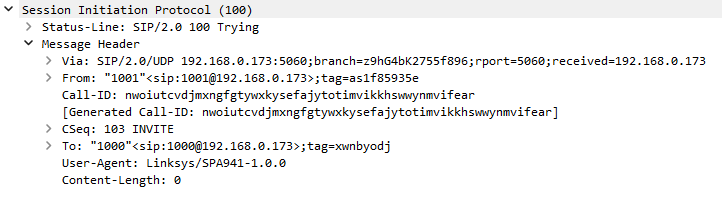
SIP Attended transfer Trying PDU
This SIP Attended Transfer Trying PDU is the 100 Trying response to the transfer‑related INVITE that is setting up the final call between caller and attended destination. It indicates that the network is processing the new INVITE generated by the REFER. Seeing this Trying confirms that the attended transfer is progressing beyond simple acceptance.
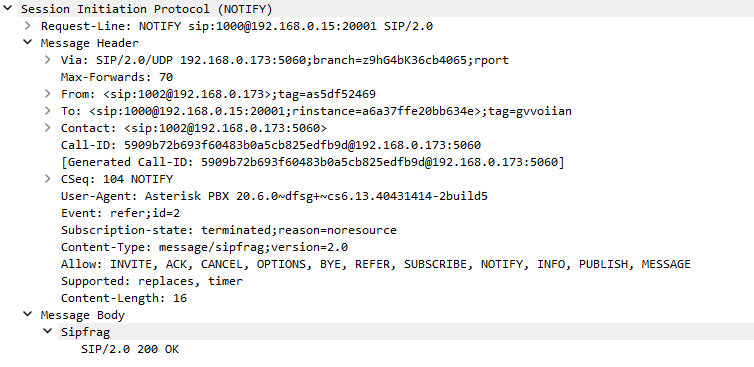
SIP Attended transfer Notify PDU
A SIP Attended Transfer Notify PDU is the NOTIFY message sent to report the status of the REFER‑initiated transfer, such as ringing or successful connection. Its body contains a SIP status fragment (for example 180 Ringing or 200 OK) describing the new call leg’s progress. This PDU lets the transferring endpoint know whether the attended transfer has actually connected the caller to the target party.
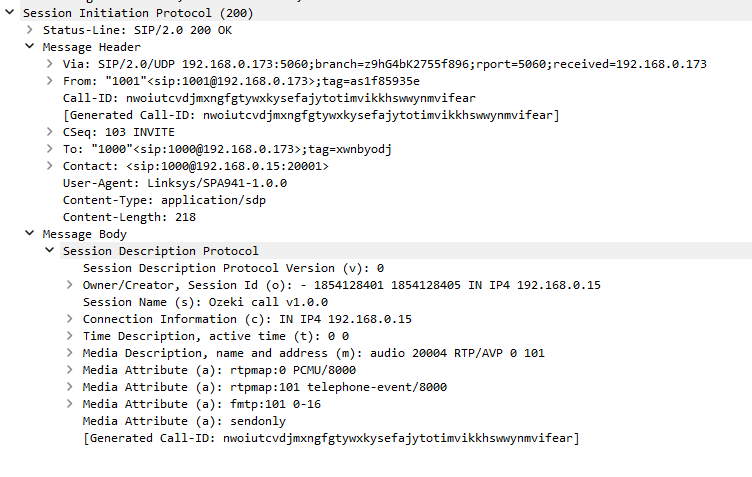
SIP Attended transfer OK(Invite) PDU
This SIP Attended Transfer OK (Invite) PDU is the 200 OK for the transfer‑related INVITE that finally joins the original caller with the attended destination. Its SDP confirms the negotiated media parameters for the new, post‑transfer call. Once this OK is sent and acknowledged, the attended transfer is functionally complete from the caller’s perspective.
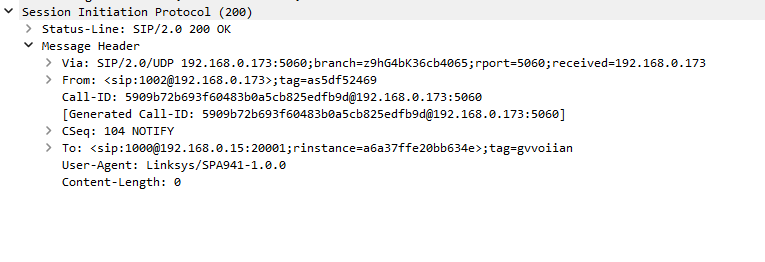
SIP Attended transfer OK(Notify) PDU
A SIP Attended Transfer OK (Notify) PDU is the 200 OK response to the NOTIFY message, confirming that the transferring endpoint has received and accepted the transfer status report. It closes out the REFER subscription related to this attended transfer event. In the trace, this PDU marks the end of the notification cycle once the new call leg’s outcome is known.
SIP Attended transfer ACK PDU
This SIP Attended Transfer ACK PDU is the acknowledgment for the 200 OK of the final transfer‑related INVITE, confirming that the offer/answer exchange is complete. It preserves the dialog identifiers for the new caller–target session now in place. After this ACK, media flows only on the transferred leg, and the transferor can begin to release its own dialogs.
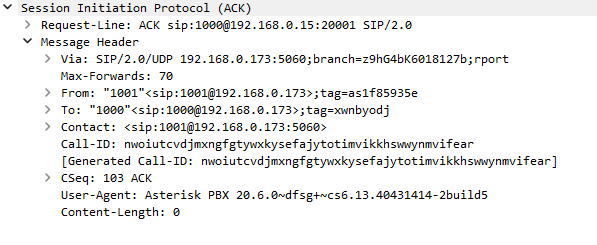
SIP Attended transfer Bye PDU
A SIP Attended Transfer Bye PDU is the BYE request used to terminate the initial consultation call between the transferor and the attended target once the main transfer is complete. It carries the Call-ID and tags of that consultation dialog so it can be torn down cleanly. Sending this BYE ensures that only the caller–target leg remains active after the attended transfer succeeds.
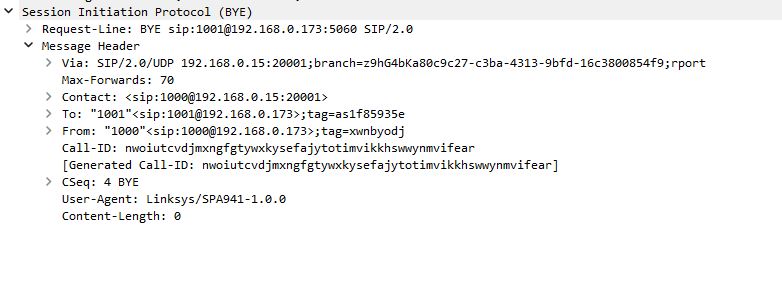
SIP Attended transfer Bye PDU
This SIP Attended Transfer Bye PDU represents a BYE on the original leg between the caller and the transferor, sent when the transferor fully leaves the conversation. It uses the original dialog’s Call-ID and tags to end that relationship cleanly. After this BYE, the caller should only remain connected to the attended destination through the new leg.
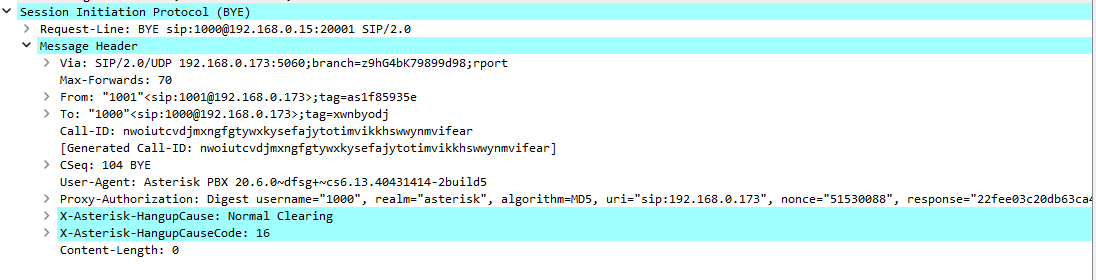
SIP Attended transfer OK(Bye) PDU
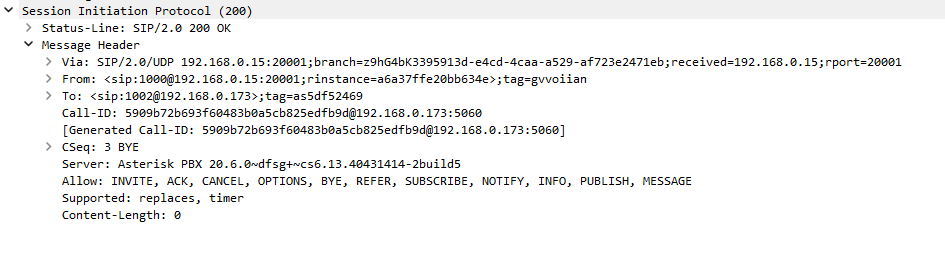
A SIP Attended Transfer OK (Bye) PDU is the 200 OK response confirming that the BYE for the consultation leg has been processed and that this side call is now closed. It echoes the BYE’s CSeq and dialog identifiers to finish the transaction. With this OK logged, the consultation leg’s resources are released while the transferred call continues.
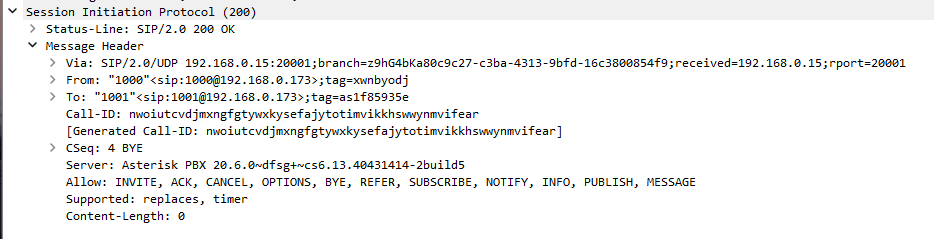
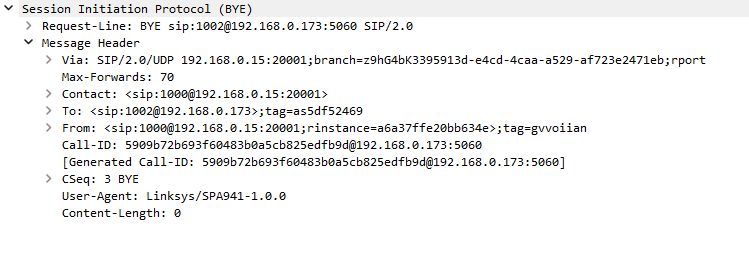
SIP Attended transfer Bye PDU
A third SIP Attended Transfer Bye PDU appears when the attended destination itself terminates the final caller–target dialog at the end of the conversation. This BYE reuses the Call-ID, To/From tags, and an incremented CSeq to close the last remaining session created by the attended transfer. Once this BYE is sent and its OK (Bye) response is received, all dialogs involved in the attended transfer scenario are fully torn down.
SIP Attended transfer OK(Bye) PDU
This SIP Attended Transfer OK (Bye) PDU is the 200 OK acknowledging the BYE that closed the transferor–caller dialog. It finalizes the transaction and signals that the transferor is no longer part of the call. Once this OK appears in Wireshark, the attended transfer topology is reduced to a single stable dialog between caller and target.