
How to build a predictive autodialer in C# with Ozeki VoIP SIP SDK
 |
Download: | predictive-dialer.zip |
This guide demonstrates how to develop a Predictive Autodialer softphone in C# using the Ozeki VoIP SIP SDK, which automatically dials telephone numbers from a CSV file and connects answered calls to available ring group agents. The application uses six main classes (Softphone, Program, CallInfo, ConfigStore, CallHandler, and Autodialer) to manage parallel calls, handle agent availability, and route audio data between clients and agents through media senders and receivers.
Why do we need a predictive autodialer?
A basic autodialer can work through a list of numbers on its own, but it can only play a fixed recorded message. The moment a client wants to actually talk to someone, a human agent still has to be free and dialed in at exactly the right time, or the client is left listening to dead air or gets connected before anyone is ready. A predictive autodialer solves this by calling the client first, then automatically ringing an available agent from a ring group and connecting the two, so the agent only picks up once a real client is already on the line.
What is a predictive autodialer?
An autodialer is an electronic device or software that automatically dials telephone numbers,
and once a call has been answered, the autodialer either plays a recorded message or connects the call to a live person.
When an autodialer connects an answered call to a live agent, it is often called a "predictive dialer" or "power dialer".
A predictive dialer uses realtime analysis to determine the optimal time to dial more numbers, whereas a power dialer
simply dials a pre-set number of lines when an agent finishes the previous call.
How does it work?
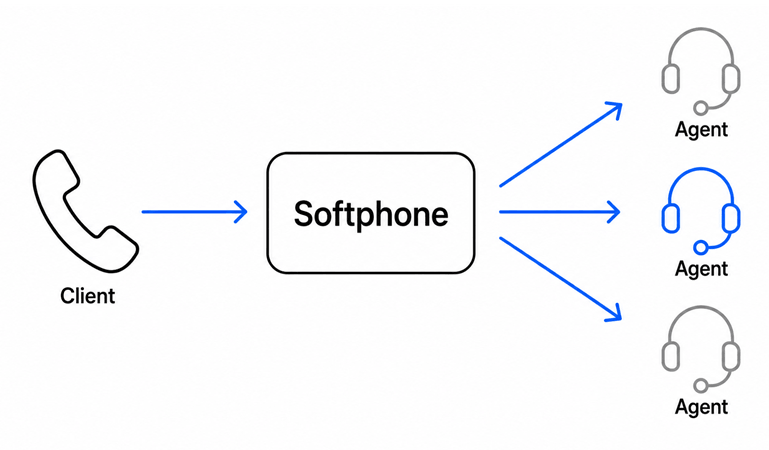
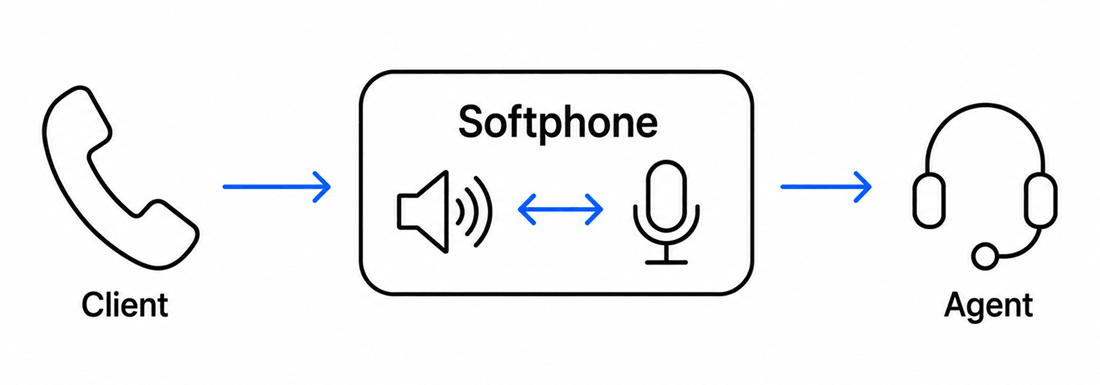
When a client answers, the CallHandler rings every agent currently marked free in the ConfigStore and waits for the first one to pick up, hanging up the rest once that happens. The softphone attaches its own media sender and receiver to both the client call and the winning agent call, then connects them through a MediaConnector so audio flows between the two without ever transferring the call itself.
How to build and run your solution
Download the project, extract the archive, and open the solution in Visual Studio. Locate the example CSV file to see how client phone numbers and notes are formatted and where the file lives in the project, then start the application.
How to test the solution
Enter your SIP account details and wait for registration to succeed. Set the number of ring group agents and their phone numbers, then set the maximum number of simultaneous calls, which can't exceed the number of agents. Press Enter to use the default example CSV file, or provide the path to your own, and confirm that each answered client call gets connected to an agent who picks up.
Key source code
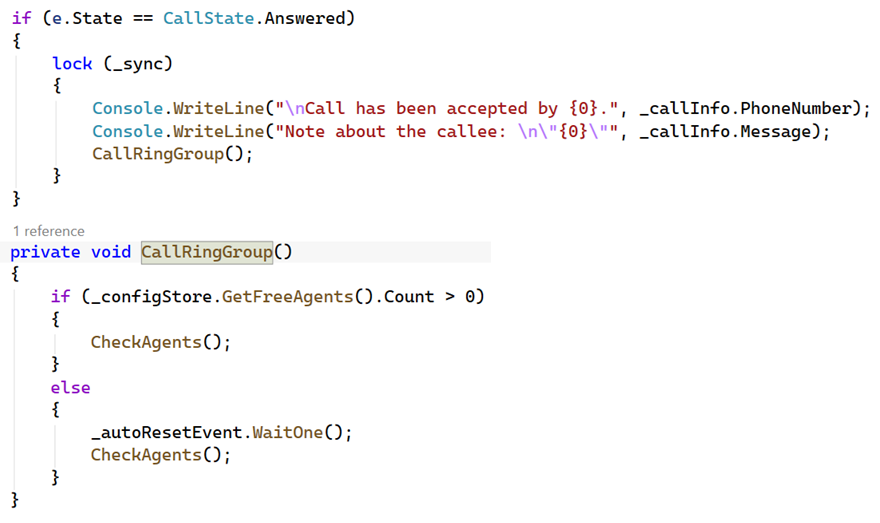
The core of this example is the client answer handler in CallHandler.cs.
When the client's call state becomes Answered, it immediately calls
CallRingGroup(), which either rings every currently free agent right
away, or waits on an AutoResetEvent until one becomes free. This is the
exact moment a predictive autodialer decides to start bringing an agent into the
call.
Capture SIP traffic with Wireshark
Start a Wireshark capture on the network interface used by the softphone, then run
the same test as above. Apply a sip display filter
and watch for two separate call legs: an INVITE to the client's number, followed
shortly after the client answers by a second INVITE to a free agent's extension,
each carrying its own unique Call-ID.
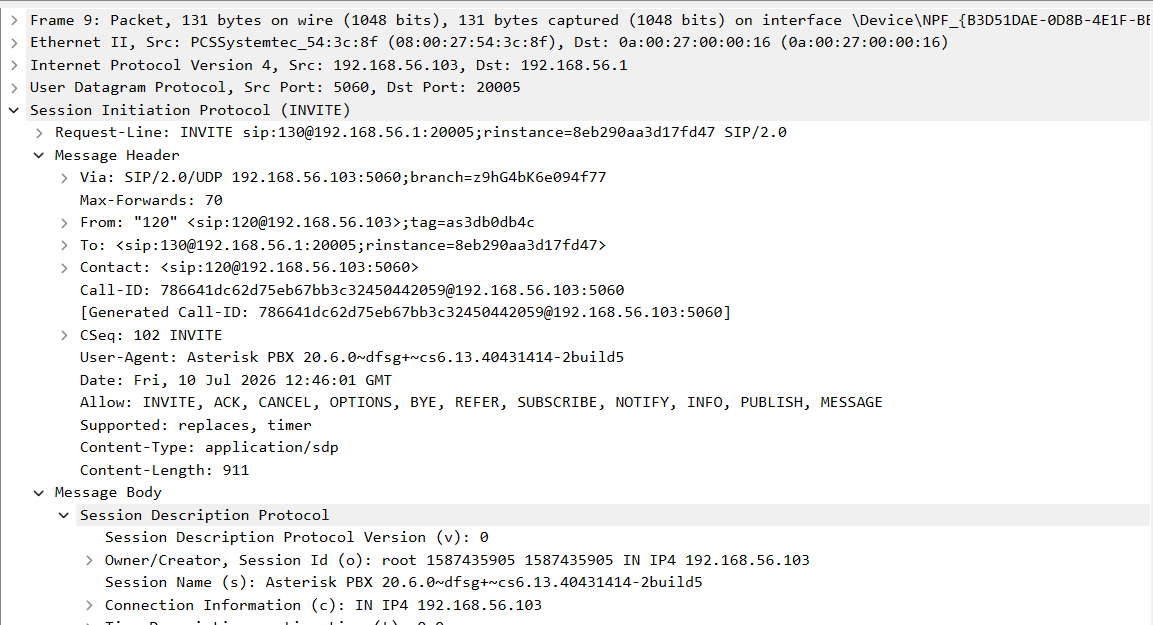
What is a SIP client INVITE PDU
This is the INVITE the softphone sends to the client's number from the CSV list,
identified by its own unique Call-ID. This is the first of two
independent call legs the softphone manages for every connected client-agent pair.
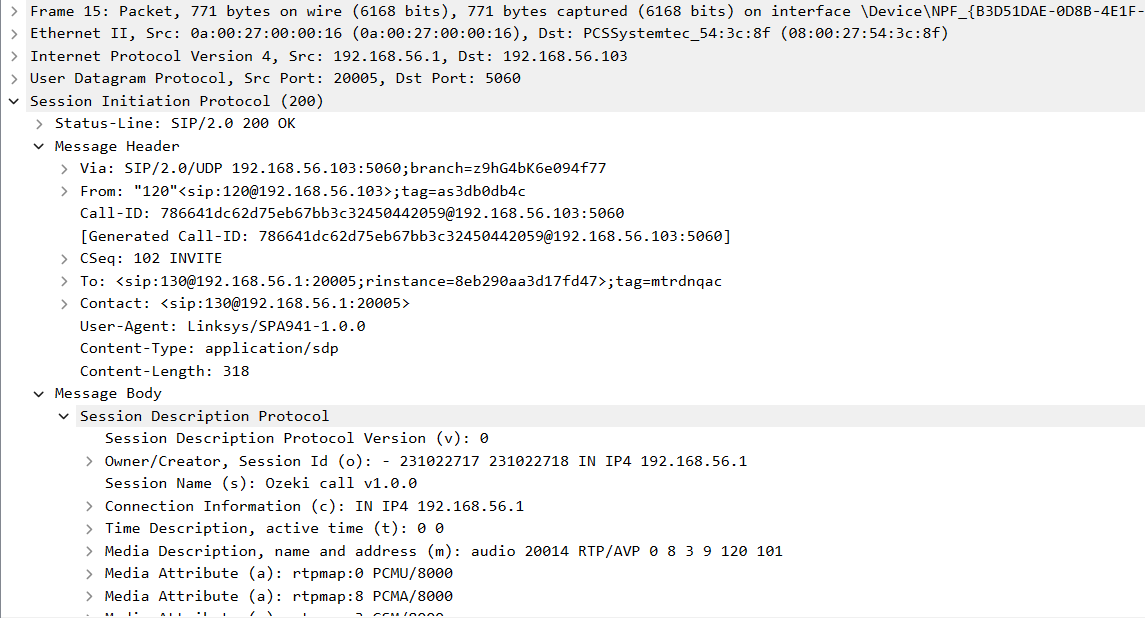
What is a SIP client OK PDU
This is the client's response accepting the call, sharing the same
Call-ID and CSeq as the INVITE above, confirming it's the
matching answer to that exact request. Once this arrives, the CallHandler's
ClientCallStateChanged handler moves into the Answered
state and starts ringing the agents in the ring group.
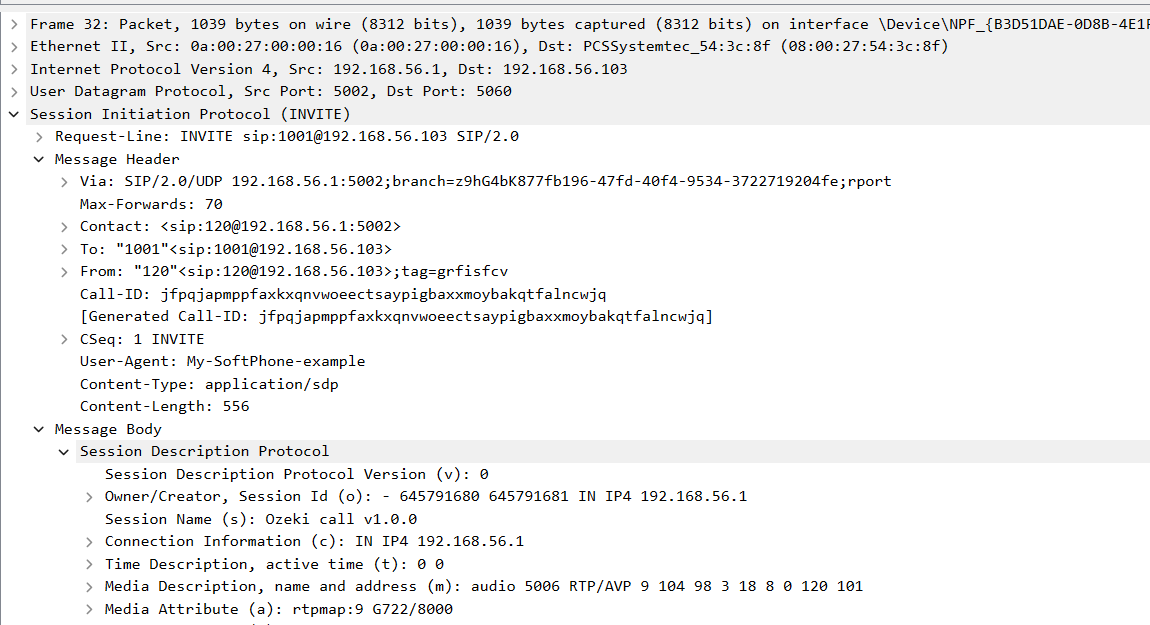
What is a SIP agent INVITE PDU
This is the INVITE the softphone sends to a free agent's extension, carrying a
completely different Call-ID from the client leg. Since this is a
separate SIP dialog rather than a transfer, the softphone can keep routing audio
between the two independent calls through its own media handlers.
Debug SIP events in Asterisk
Connect to the Asterisk console and enable SIP debug output, then run the predictive autodialer against the example CSV file. Watch a client get called and answer, then watch a second call go out to a free agent immediately afterward, and confirm the call is only bridged once one agent actually picks up.
What knowledge would you need?
This example assumes you're already familiar with SIP registration, media handlers, making and accepting calls, parallel call management, and the basic Autodialer, covered in the earlier tutorials linked below.
- SIP registration
- Managing media handlers
- Making and accepting calls
- Parallel call management
- How to build an Autodialer
This example uses six classes
- Softphone.cs — registers to a PBX and creates outgoing call objects.
- Program.cs — asks for SIP details, ring group agents, the concurrency limit, and the CSV path.
- CallInfo.cs — represents one CSV row as a phone number and client note pair.
- ConfigStore.cs — the single shared instance holding the agent list, free agent list, and client list.
- CallHandler.cs — dials one client, then rings the ring group and bridges the winning agent.
- Autodialer.cs — creates a CallHandler per client, throttled to the number of agents.
This guide continues developing the Autodialer example, so only the new steps and differences from that simpler version are covered below.
What is Softphone.cs used for?
The autodialer's softphone class is able to register to a pbx, provides information
about the phone line's state, and also creates call objects, when needed.
Please note that, since the softphone doesn't need to be able to receive incoming calls,
it shouldn't be registered to a PBX, which means that the registrationRequired field of
the sip account can be set to "false". Without registering to a pbx, the autodialer
is still able to dial phone numbers through the pbx, if that is reachable and allows it.
Program.cs and CallInfo.cs
Program.cs collects the SIP account details, then asks for the number of ring group
agents and each of their phone numbers before reading the CSV file, capping the
concurrency limit at the number of agents available. Each CallInfo
represents one CSV row, pairing a client's phone number with a note about them that
gets printed to the console once the call connects.
for (int i = 0; i < _memberCount; i++)
{
    Console.Write(" {0}. member's phone number: ", i + 1);
    string member = Console.ReadLine();
    _configStore.AddAgent(member);
    _configStore.AddFreeAgent(member);
}
What is ConfigStore.cs used for?
ConfigStore is a single shared instance holding three lists: every agent in the ring group, the agents currently free, and the clients still waiting to be called, along with the methods to add, remove, and read each one. Program.cs populates the agent and client lists; CallHandler reads and updates the free agent list as calls start and end.
What is CallHandler.cs used for?
Each CallHandler dials one client from the CSV list. Once the client answers, it rings every free agent with the RingAll strategy — see the Ring Group guide for strategy details — and connects the first agent who picks up. Audio is routed through the softphone's own media handlers rather than transferring the calls to each other. A predictive dialer attempt can end a few different ways: the client can't be reached (busy or error), in which case the next client is called; the client answers but every rung agent rejects or misses the call, in which case the client is hung up and the next client is called; or an agent answers and the two are bridged.
public void Start()
{
    lock (_sync)
    {
        _call = _softphone.CreateCall(_callInfo.PhoneNumber);
        _call.CallStateChanged += ClientCallStateChanged;
        mediaReceiverFromClient.AttachToCall(_call);
        mediaSenderToAgent.AttachToCall(_call);
        connectorFromClient.Connect(mediaReceiverFromClient, mediaSenderToAgent);
        _call.Start();
    }
}
When the client answers, CallRingGroup() checks the free agent list and
calls CheckAgents(), which dials every free agent and tracks how many
are currently ringing in _ringingAgents:
void CallRingGroup()
{
    if (_configStore.GetFreeAgents().Count > 0)
        CheckAgents();
    else
    {
        _autoResetEvent.WaitOne();
        CheckAgents();
    }
}

void CheckAgents()
{
    lock (_sync)
    {
        _ringingAgents = 0;
        foreach (var freeAgent in _configStore.GetFreeAgents())
        {
            var callAgent = _softphone.CreateCall(freeAgent);
            callAgent.CallStateChanged += AgentCallStateChanged;
            _freeAgentChecks.Add(callAgent);
            _ringingAgents++;
        }
        foreach (var freeAgentCheck in _freeAgentChecks)
            freeAgentCheck.Start();
    }
}
When the first agent answers, SetupAgentDevices() attaches its media
sender and receiver and connects them to the client's, while
HangUpAgents() drops every other agent that was still ringing so the
softphone doesn't end up bridged to more than one:
void SetupAgentDevices(IPhoneCall call)
{
    lock (_sync)
    {
        _agentCall = call;
        mediaReceiverFromAgent.AttachToCall(call);
        mediaSenderToClient.AttachToCall(call);
        connectorFromAgent.Connect(mediaReceiverFromAgent, mediaSenderToClient);
    }
}

void HangUpAgents()
{
    lock (_sync)
    {
        foreach (var checkedAgent in _freeAgentChecks)
        {
            checkedAgent.HangUp();
            DestructAgentDevices(checkedAgent);
        }
        _freeAgentChecks.Clear();
    }
}
Hold and unhold are handled indirectly, since the client and agent are never transferred to each other — the softphone mirrors each side's hold state onto the other call:
else if (e.State == CallState.RemoteHeld && _agentCall != null)
    _agentCall.Hold();
else if (e.State.IsInCall() && _agentCall != null)
{
    if (_agentCall.CallState == CallState.LocalHeld || _agentCall.CallState == CallState.InactiveHeld)
        _agentCall.Unhold();
}
A _needToHangUp flag guards against hanging up the same leg twice: once
either the client or the agent hangs up, the flag is cleared so the other side's own
call-ended handler doesn't also try to hang up a leg that's already gone. When the
client's call ends, its devices are detached, the still-ringing agents are hung up
via HangUpAgents(), and a Completed event notifies the
Autodialer. When an individual agent's call ends instead,
DestructAgentDevices() cleans up just that agent's own devices, the
agent is returned to the free agent list, and once every rung agent has ended
without connecting, the client is hung up and ReadyToCall tells the
Autodialer it can call the next client:
// Client call ended
else if (e.State.IsCallEnded())
{
    lock (_sync)
    {
        DestructClientDevices();
        if (_needToHangUp && _agentCall != null)
        {
            _needToHangUp = false;
            _agentCall.HangUp();
        }
        var handler = Completed;
        if (handler != null) handler(this, EventArgs.Empty);
        HangUpAgents();
    }
}

// Individual agent call ended
else if (e.State.IsCallEnded())
{
    lock (_sync)
    {
        _ringingAgents--;
        if (!_configStore.GetFreeAgents().Contains(currentCall.DialInfo.Dialed))
        {
            if (_needToHangUp)
            {
                _needToHangUp = false;
                _call.HangUp();
            }
            _configStore.AddFreeAgent(currentCall.DialInfo.Dialed);
            _autoResetEvent.Set();
        }
        DestructAgentDevices(currentCall);

        if (_ringingAgents == 0)
        {
            HangUpClient();
            var handler = ReadyToCall;
            if (handler != null) handler(this, EventArgs.Empty);
        }
    }
}
Only the main functions were covered here — for the full listing, study the source code directly, and the simpler Autodialer example if you haven't already.
Autodialer.cs
The Autodialer creates a CallHandler per client and starts it, waiting
for a ReadyToCall event before starting the next one, so it never has
more calls in flight than there are agents to answer them. This mirrors the
throttling pattern from the basic Autodialer, adapted to
release on agent availability instead of a fixed concurrency number.
Conclusion
From this example you could learn how to create predictive autodialer, which is a softphone application and is able to read and process csv files, make calls simultaneously to the destinations, handle a ring group of agents, and send audio data from one call to another through itself by connecting the correct devices.
If you have any questions or need assistance, please contact us at info@voip-sip-sdk.com