
How to create a ring group in C# with Ozeki VoIP SIP SDK
 |
Download: | ring-group.zip |
|
Download: | ring-group-ring-one-by-one.zip |
|
Download: | ring-group-random.zip |
The principle of ring group creation is to create a softphone, which tries to transfer the incoming call to one of a set of other extensions.
To be able to do it, the softphone should be registered to a PBX, since it needs to be reachable by other extensions.
These examples will introduce how to create ring group extensions, which are able
to transfer calls to one of the selected extensions by different strategies.
Why do we need a ring group?
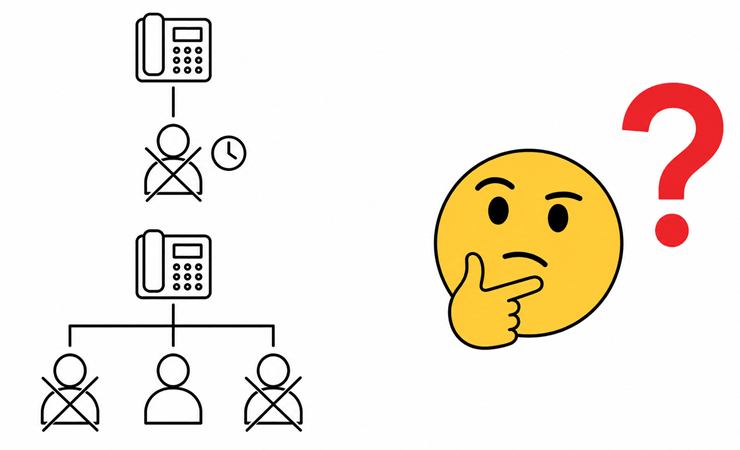
A single extension can only ring one phone, so if that person is away, busy, or doesn't pick up, the caller gets no answer and the call is lost. Teams need incoming calls to reach whoever is actually available, not just one fixed number. A ring group solves this by calling several extensions on behalf of one incoming call, and connecting the caller to whichever member picks up first, so a missed call only happens when every member is unreachable.
What is a ring group?
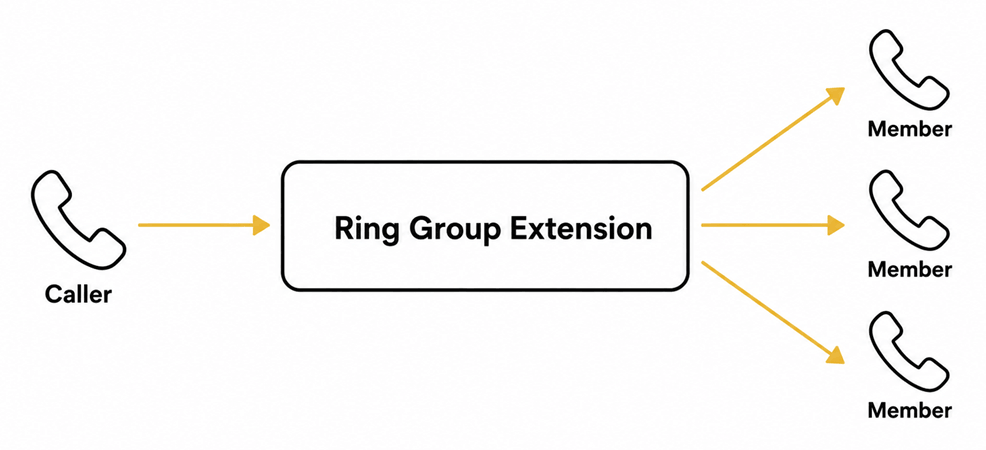
A ring group is an extension that doesn't belong to a single person, but instead represents a set of members who can all potentially answer an incoming call. When someone calls the ring group's number, the softphone calls out to the group's members according to a chosen strategy, and transfers the caller to whichever member answers first, stepping out of the call once the transfer completes.
What is a ring strategy?
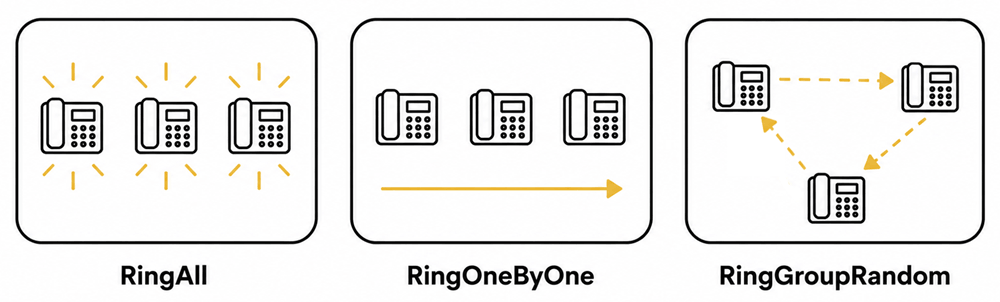
Before transferring a call, the ring group first needs to notify the group's members that the call is about to be transferred; once a member accepts the call, the extension transfers it by using the AttendedTransfer() method. To select the member which will be called within a group, there are several strategies, for example:
- RingAll: all extensions in the ring group will be called simultaneously.
- RingOneByOne: the ring group extension will call the members one by one, in a preset order. This example will call the extensions in the same order as they were added to the ring group.
- RingGroupRandom: the extensions of the ring group will be called in a randomized order.
How does it work?
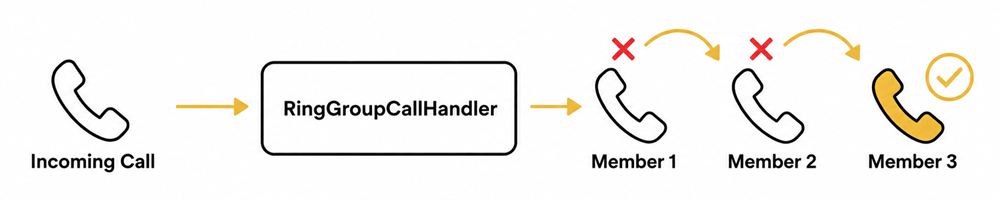
When a call comes in, the RingGroupCallHandler answers it and builds a list of outgoing calls to every member, but only starts the first one. The CallSequencer method calls one member at a time: if that member is busy or unreachable, the call is removed from the list and CallSequencer immediately tries the next one. The moment any member answers, AttendedTransfer hands the caller off to them, and the sequence stops there.
How to build and run your solution
Download and extract the ring-group-ring-one-by-one.zip archive, then open the solution in Visual Studio, build it, and run the compiled console application. This video uses the RingOneByOne example specifically; the same steps apply if you'd rather start from the RingAll or RingGroupRandom project instead.
How to test the solution
Enter your SIP account details and wait for registration to succeed, then enter the number of ring group members and each of their phone numbers. Place a call to the ring group extension from another line, and confirm the members are called one by one in the order they were added, stopping and transferring the call the moment one of them answers.
Key source code
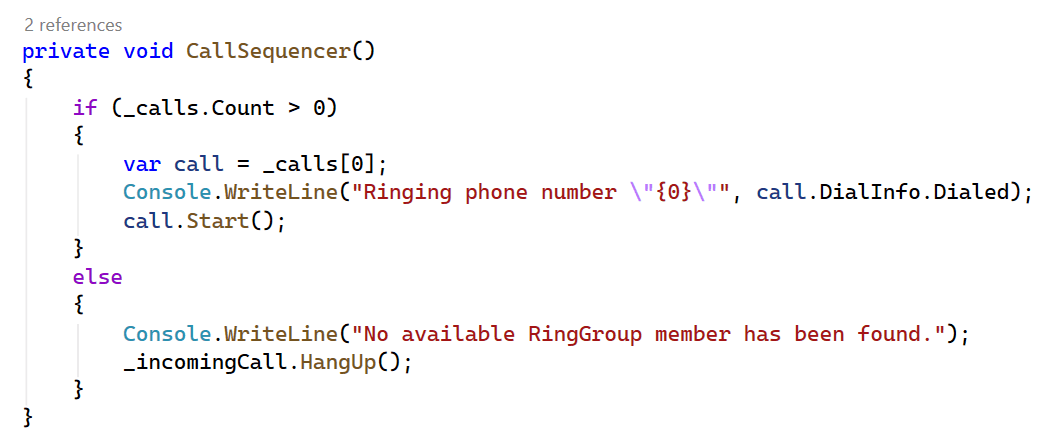
The core of the RingOneByOne strategy is CallSequencer(). It starts a
call to only the first member left in the list, or hangs up the incoming call if no
members remain. Every time a member is removed from the list, whether because they
answered or because they were busy, calling this method again naturally picks up
whichever member is now first, producing the one-at-a-time dialing order.
Capture SIP traffic with Wireshark
Start a Wireshark capture on the network interface used by the softphone, then run
the same test as above with at least one member set to reject or ignore the call.
Apply a sip display filter and locate the busy or error response for the
unreachable member, followed shortly after by a new INVITE to the next member in the
list. Once a member answers, locate the REFER request that transfers the caller to
them.
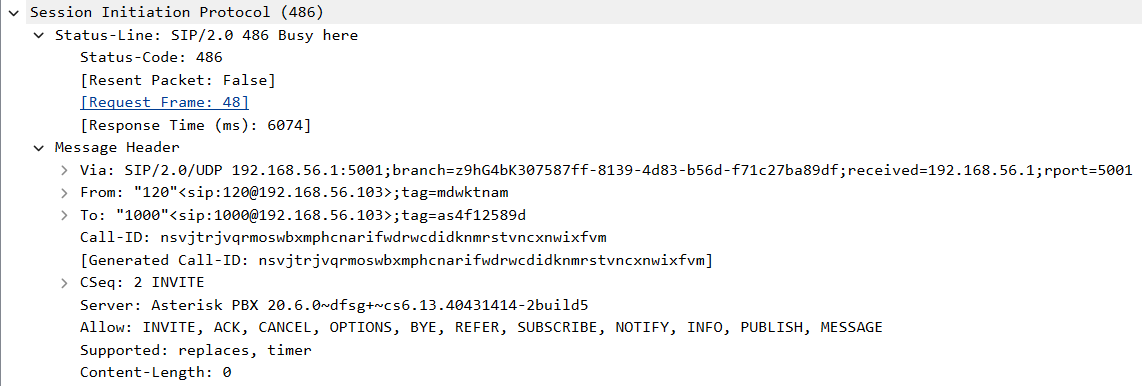
What is a SIP member busy PDU
This is the 486 Busy Here response for the first member tried, matched to its
INVITE by the shared CSeq value. This response is what triggers
CallSequencer to remove this member from the list and immediately call the next one,
rather than giving up on the incoming call.
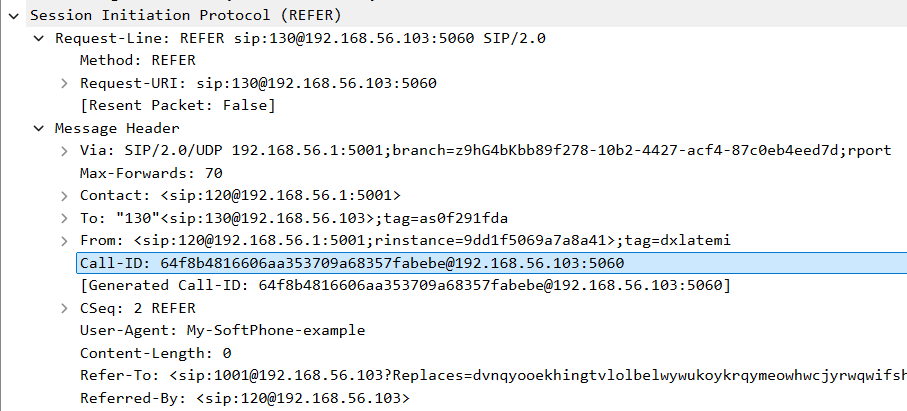
What is a SIP attended transfer REFER PDU
This REFER request is how the ring group hands the original caller off to the
member who answered, carrying a Refer-To header that names the
destination extension directly. This is the SIP-level effect of calling
AttendedTransfer, and it's what lets the ring group step out of the call entirely
once the transfer completes.
Debug SIP events in Asterisk
Connect to the Asterisk console and enable SIP debug output, then run the same test against the ring group extension. Watch the console log each outgoing call to a member in sequence, and confirm the eventual REFER and the resulting call bridge appear once a member answers.
What knowledge would you need?
This example assumes you're already familiar with SIP registration, media handlers, making and accepting calls, and call transfer, covered in the earlier tutorials linked below.
- SIP registration
- Managing media handlers
- Making and accepting calls
- Controlling the call
- Parallel call management
Ring group source code in C#
To create a ring group example in C#, the best option is to define 3 classes. The first class illustrates how to create a softphone in C#, the second will demonstrate how to add ring group code to the sip softphone, the third will demonstrate a simple way to use the sip register C# method to register to the VoIP PBX.
- Softphone.cs: represents a softphone, which is able to register to a PBX.
- RingGroupCallHandler.cs: the function of the class is to implement one of the previously introduced ringing strategies. Since it's separated into a separate class, the application can handle multiple incoming calls simultaneously with its instances.
- Program.cs: a class to handle the user events, such as asking for sip register information, asking for the ring group's members' phone numbers, notifying the user about the results and states etc.
Softphone.cs
The softphone registers to a PBX and exposes two events: one for the phone line's registration state, and one for incoming calls. It also creates outgoing call objects on request, which RingGroupCallHandler uses to dial each member.
public IPhoneCall CreateCall(string member)
{
    return _softphone.CreateCallObject(_phoneLine, member);
}
Program.cs
Program.cs registers to the PBX, then once registration succeeds, asks for the
number of ring group members and each of their phone numbers, stored in a list of
strings. From that point, the extension is ready to accept incoming calls. When one
arrives, Program.cs creates a RingGroupCallHandler for it, subscribes to its
Completed event, adds it to a list of active handlers, and starts it:
var callHandler = new RingGroupCallHandler(e.Item, _softphone, _members);
callHandler.Completed += callHandler_Completed;

lock (_callHandlers)
    _callHandlers.Add(callHandler);

callHandler.Start();
Once the call is transferred or the caller hangs up, the handler is removed from that list:
static void callHandler_Completed(object sender, EventArgs e)
{
    lock (_callHandlers)
        _callHandlers.Remove((RingGroupCallHandler) sender);
}
RingGroupCallHandler.cs and the RingAll strategy
Each RingGroupCallHandler answers its incoming call, then implements one ring
strategy. With RingAll, Start() answers the call and immediately calls
StartOutgoingCalls(), which creates a call object for every member and
starts all of them at once, so every member's phone rings simultaneously:
public void Start()
{
    _incomingCall.Answer();
    _incomingCall.CallStateChanged += call_CallStateChanged;
    StartOutgoingCalls();
}

void StartOutgoingCalls()
{
    foreach (var member in _members)
    {
        var call = _softPhone.CreateCall(member);
        call.CallStateChanged += OutgoingCallStateChanged;
        _calls.Add(call);
    }

    lock (_sync)
    {
        foreach (var call in _calls)
        {
            call.Start();
        }
    }
}
Every outgoing call is subscribed to OutgoingCallStateChanged. The
moment any one of them is answered, that call is used to transfer the original caller,
removed from the calls list, and
OnCompleted() runs. If a call instead comes back Busy or Error, it's
hung up and removed from the list; once no calls remain without an answer, the
incoming caller is hung up too, since nobody was reachable:
void OutgoingCallStateChanged(object sender, CallStateChangedArgs e)
{
    var call = (IPhoneCall)sender;

    if (e.State == CallState.Answered)
    {
        _incomingCall.AttendedTransfer(call);

        lock (_sync)
        {
            _calls.Remove(call);
            OnCompleted();
        }
    }

    if (e.State == CallState.Busy || e.State == CallState.Error)
    {
        lock (_sync)
        {
            call.HangUp();
            _calls.Remove(call);
            if (_calls.Count == 0)
            {
                Console.WriteLine("No available destination.");
                _incomingCall.HangUp();
            }
        }
    }
}
OnCompleted() hangs up and clears any remaining outgoing calls via
HangupOutgoingCalls(), then raises the Completed event that
tells Program.cs this handler is done — either because the transfer succeeded, or
because the incoming call ended before anyone answered:
void HangupOutgoingCalls()
{
    foreach (var call in _calls)
    {
        call.HangUp();
    }
    _calls.Clear();
}
RingOneByOne and RingGroupRandom strategies
These two strategies share the same core rule: if one member picks up, the others
are never even rung, and if a member is busy or unreachable, the handler moves on to
the next one instead of giving up. Both still call StartOutgoingCalls()
to build the list of members, but they never start every call at once — instead,
each one calls CallSequencer(), which hangs up the incoming call if the
list is empty, or starts exactly one outgoing call otherwise. RingOneByOne always
picks the first member left in the list, preserving the order they were added in:
private void CallSequencer()
{
    if (_calls.Count > 0)
    {
        var call = _calls[0];
        call.Start();
    }
    else
    {
        _incomingCall.HangUp();
    }
}
RingGroupRandom instead picks a random member from whatever's left in the list each time:
private void CallSequencer()
{
    if (_calls.Count > 0)
    {
        _randomMemberToDial = _randomInt.Next(_calls.Count);
        var call = _calls[_randomMemberToDial];
        call.Start();
    }
    else
    {
        _incomingCall.HangUp();
    }
}
When the currently dialed member is busy or unreachable, the handler doesn't hang up
the incoming call — it calls CallSequencer() again, which decides
whether to try another member or give up. Everything else works exactly as in the RingAll strategy above.
Conclusion
This tutorial covered building a ring group extension that answers an incoming call and connects it to whichever member responds first, using AttendedTransfer to hand the caller off and step out of the call once the transfer completes. It also covered three ways to choose which members get called and in what order: RingAll, RingOneByOne, and RingGroupRandom, and verified the RingOneByOne strategy's call-skipping and transfer behavior by inspecting busy responses and the REFER request in Wireshark.