How to hang up the call?
We are talking about a really simple function. Hang up the call means ending an active phone or VoIP conversation by closing the session and releasing the resources used for it. In the Ozeki VoIP SIP SDK example, this is done by calling call.HangUp() and then setting the call object to null, which helps return the softphone to an idle state.
if (call != null)
{
	call.HangUp();
	call = null;
}
If the call exists, we just need to use the call object's HangUp() method, and then to set the call object to "null".
Call flow diagram
The diagram below illustrates a full SIP Hang up call flow.
Capture SIP hangup traffic with Wireshark
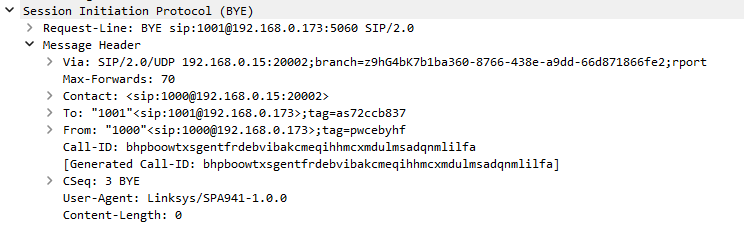
SIP Bye PDU
A SIP BYE PDU is the termination request sent by either party to end an established SIP call, signaling that the current dialog should be torn down. It reuses the existing Call-ID, To and From headers of the dialog and carries an appropriate CSeq value to ensure the BYE is processed in order within that session. When a BYE is sent or received, the softphone stops devices, detaches media handlers, unsubscribes from call events, and releases the call object to return to an idle state.
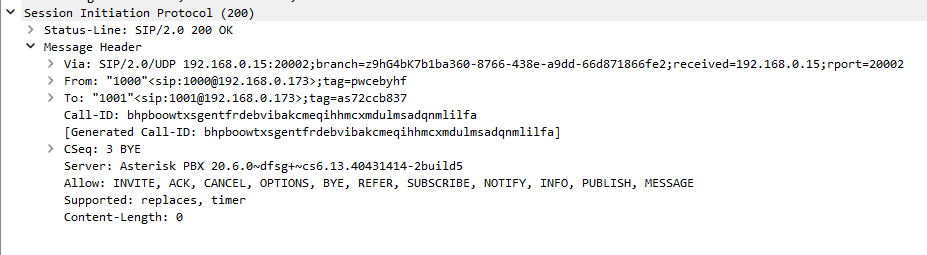
SIP OK Bye PDU
A SIP OK (BYE) PDU is the 200-class response confirming that the BYE request was successfully processed and that the call has now ended. It matches the BYE using the same Call-ID and CSeq, and includes standard To, From and Via headers to complete the transaction cleanly. After receiving this OK, both sides can safely release resources associated with the dialog, ensuring that media streams are stopped and no further signaling occurs for that call.