
How to build PBX in C#
 |
Download: | simple-pbx.zip |
This guide provides step by step instructions on how you can build a simple PBX using the superb background support of Ozeki VoIP SIP SDK. After reading through this page you will be fully familiar with all the essential terms concerning the basics of PBX building and what you will need for creating your own solution using Ozeki VoIP SIP SDK.
What is PBX? What is it used for?
The Private Branch Exchange (PBX) system is a hardware or software solution for establishing the connection between VoIP clients. It basically operates with SIP messages that are sent to and from the clients.
A Private Branch Exchange is a tool for connecting together communication end points in between companies and connecting the company communication systems to the outside world.
The PBX is mainly used for connection establishment between end points. This is done in the PBX system through the Session Initiation Protocol that uses a SIP account for the connection establishment.
A SIP connection line is established between two communication end points in the following way. Both end points need to register to the PBX with a valid SIP account. This registration is done by sending a REGISTER SIP message to the PBX that sends back authentication data to the end point. The registration is done by sending another REGISTER message that contains the authentication information gotten from the PBX.
When the communication end points are registered to the PBX, they can start communication with each other by dialing the extension ID (phone number) of the other end point. When a phone call is started, the call request goes through the PBX that sends it it the remote party. The phone line establishment is done when both communication parties acknowledged the call. When the line is established, the PBX exits the call and the communication between the end points becomes peer to peer.
What are the basic PBX functionalities?
A PBX system can be used for a lot of communication purposes. The following list shows the basic features that should be implemented in a PBX.
- Ext1 calls Ext2 - a communication line is established between two extensions of the PBX system. These are usually two company VoIP phones (softphone or physical) that are in the same network.
- Ext1 rings Ext2 and Ext3, and the first one to answer gets the call - a simple example for dial planning, when more than one extensions are ringed at the same time from a third PBX extension. When one of the called extensions answers the call, the other stops ringing and the phone line is established between the caller and the answerer extensions.
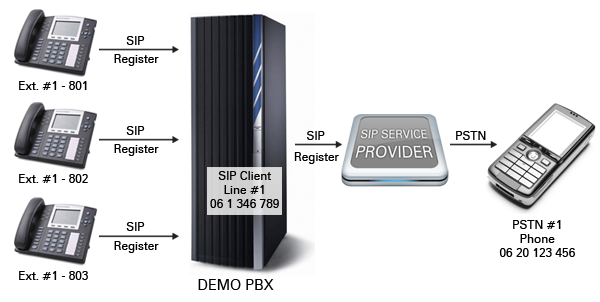
- Ext1 calls Phone1 (PSTN) - a VoIP PBX extension starts a cal towards a traditional telephone through the PBX-PSTN connection
- PSTN1 calls Line1 that rings at Ext1 - incoming call handling that arrives from a PSTN end point on Line1 and rings at the Ext1 extension
- PSTN1 calls Line1 that rings at Ext1 and Ext2, and the first one to answer gets the call
The PBX has some advanced functionalities that are for establishing extended communication networks. The PBX can define so called dial plans that are sets of rules for the calling procedures. In a default case when a communication party calls a number, the extension with that number will ring and in case of no answer the call will stop at some point.
A more sophisticated dial plan can define more advanced calling protocols. For example you can specify that when somebody calls the "100" extension, not only that end point, but others should ring and whichever end points answers the call, the others stop ringing and the line establishes between the caller and the answerer.
How can be the PBX and outside phones connected?
A PBX system is the connection point between the PSTN (Public switched telephone network) - wired or mobile telephone network - and the VoIP world. In order to connect these two networks, you need to connect your PBX to a service provider that will ensure the actual connection between the networks.
When connected to the PSTN, the traditional telephones can be reached from the VoIP end points and vice versa. This means that you can call a wired telephone from your VoIP phone set or even from a software phone, and you can start communication from a wired telephone toward VoIP communication hardware and software.
The PSTN connection is done by registering PBX extensions for the SIP service provider that will be used for the wired or mobile devices. It means that the PSTN will be seen as one or more VoIP extensions from the VoIP side and the VoIP network will be seen as one or more standard telephone lines from the PSTN side.
The dial planning works in this case too. This means that you can define dialing and ringing rules in the case of outside calls too. As these calls are handled the same way in the PBX as the pure VoIP calls, the dial plans can be used the same way too as in the case of simple VoIP to VoIP communication.
How to implement simple PBX using C#?
A simple PBX functionality can be implemented with Ozeki VoIP SIP SDK in a really simple way. The default behavior of a PBX is provided by the SDK, but you can redefine any functionality to meet your company purposes.
The following program code uses the background support of Ozeki VoIP SIP SDK,
therefore you will need to download and install the SDK on your computer before
starting to use the program code. You will also need to have Visual Studio 2012
or compatible IDE and .NET Framework installed on your system, as the program
code below is written in C# language.
You need to download and install
Ozeki VoIP SIP SDK, and you also need to add reference to it
within your visual studio project.
To create the simplest PBX, you just have to use the PBXbase class. When you create an instance of that by calling its constructor, you can set the port range of the PBX, and than you can set the PBX instance's listening port and transport type by calling the SetListenPort() method.
With these few lines you have created a working, simple PBX!
Simple PBX example in C#
using System;
using Ozeki.Network;
using Ozeki.VoIP;

namespace SimplePBX
{
    class Program
    {
        static void Main(string[] args)
        {
            var myPBX = new PBXBase(20000, 30000);
            myPBX.SetListenPort(NetworkAddressHelper.GetLocalIP().ToString(), 5060, TransportType.Udp);
            myPBX.Start();

            Console.ReadLine();
        }
    }
}